

티스토리 뷰
<!DOCTYPE html>
<html lang="ko">
<head>
  <meta charset="UTF-8">
  <meta name="viewport" content="width=device-width, initial-scale=1.0">
  <title>스위치 컨텐츠 전환 예제</title>
  <style>
    /* 기본 리셋 및 스타일 */
    * {
      box-sizing: border-box;
      margin: 0;
      padding: 0;
    }
    body {
      font-family: 'Noto Sans KR', sans-serif;
      display: flex;
      flex-direction: column;
      align-items: center;
      justify-content: center;
      min-height: 100vh;
      background-color: #eaf4ff;
      padding: 20px;
    }

    /* 토글 스위치 스타일 */
    .switch-container {
      margin-bottom: 25px;
    }

    .toggle-switch {
      position: relative;
      display: inline-block;
      width: 90px;
      height: 42px;
    }

    /* 기존 체크박스 숨기기 */
    .toggle-switch input {
      opacity: 0;
      width: 0;
      height: 0;
    }

    /* 슬라이더 배경 */
    .slider {
      position: absolute;
      cursor: pointer;
      top: 0;
      left: 0;
      right: 0;
      bottom: 0;
      background-color: #d1d5db; /* OFF 배경 (회색) */
      transition: background-color 0.3s;
      border-radius: 34px;
      display: flex;
      align-items: center;
      justify-content: space-between;
      padding: 0 12px;
      user-select: none;
    }

    /* 슬라이더 내 동그라미 원 */
    .slider::before {
      position: absolute;
      content: "";
      height: 32px;
      width: 32px;
      left: 5px;
      bottom: 5px;
      background-color: white;
      transition: transform 0.3s;
      border-radius: 50%;
      box-shadow: 0 2px 4px rgba(0, 0, 0, 0.15);
      z-index: 2;
    }

    /* 스위치 텍스트 (간편) */
    .switch-label {
      font-size: 15px;
      font-weight: bold;
      z-index: 1;
      transition: opacity 0.2s;
    }

    /* OFF 상태 텍스트 위치 (우측) 및 색상 */
    .label-off {
      margin-left: auto;
      color: #555555;
    }

    /* ON 상태 텍스트 위치 (좌측) 및 색상 */
    .label-on {
      margin-right: auto;
      color: #ffffff;
      display: none;
    }

    /* ===== ON 상태 (체크되었을 때) 스타일 정의 ===== */
    input:checked + .slider {
      background-color: #0055ff; /* ON 배경 (파란색) */
    }

    input:checked + .slider::before {
      transform: translateX(48px); /* 동그라미 오른쪽으로 이동 */
    }

    input:checked + .slider .label-off {
      display: none;
    }

    input:checked + .slider .label-on {
      display: block;
    }

    /* ===== 컨텐츠 영역 스타일 ===== */
    .content-box {
      width: 100%;
      max-width: 400px;
      padding: 24px;
      background-color: #ffffff;
      border-radius: 12px;
      box-shadow: 0 4px 15px rgba(0, 0, 0, 0.08);
      text-align: center;
      transition: all 0.3s ease;
    }

    /* 컨텐츠 숨김/표시 클래스 */
    .content {
      display: none;
    }

    .content.active {
      display: block;
    }
  </style>
</head>
<body>

  <!-- 스위치 영역 -->
  <div class="switch-container">
    <label class="toggle-switch">
      <input type="checkbox" id="modeSwitch" onchange="toggleContent(this)">
      <span class="slider">
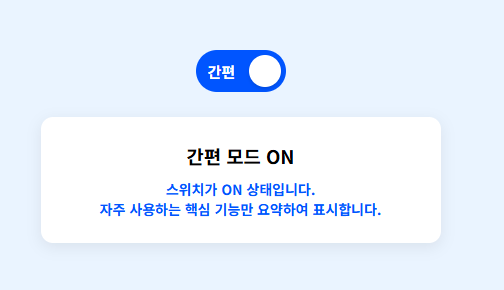
        <span class="switch-label label-on">간편</span>
        <span class="switch-label label-off">간편</span>
      </span>
    </label>
  </div>

  <!-- 컨텐츠 영역 -->
  <div class="content-box">
    <!-- OFF 상태 시 보일 컨텐츠 (일반/상세 모드 등) -->
    <div id="contentOff" class="content active">
      <h3>상세/일반 모드</h3>
      <p style="margin-top: 10px; color: #666; font-size: 14px;">
        스위치가 OFF 상태입니다.<br>
        모든 상세 정보 및 상세 입력 폼이 제공됩니다.
      </p>
    </div>

    <!-- ON 상태 시 보일 컨텐츠 (간편 모드) -->
    <div id="contentOn" class="content">
      <h3>간편 모드 ON</h3>
      <p style="margin-top: 10px; color: #0055ff; font-size: 14px; font-weight: bold;">
        스위치가 ON 상태입니다.<br>
        자주 사용하는 핵심 기능만 요약하여 표시합니다.
      </p>
    </div>
  </div>

  <!-- 스위치 상태 제어 JavaScript -->
  <script>
    function toggleContent(checkbox) {
      const contentOn = document.getElementById('contentOn');
      const contentOff = document.getElementById('contentOff');

      if (checkbox.checked) {
        // ON 상태일 때
        contentOff.classList.remove('active');
        contentOn.classList.add('active');
      } else {
        // OFF 상태일 때
        contentOn.classList.remove('active');
        contentOff.classList.add('active');
      }
    }
  </script>

</body>
</html>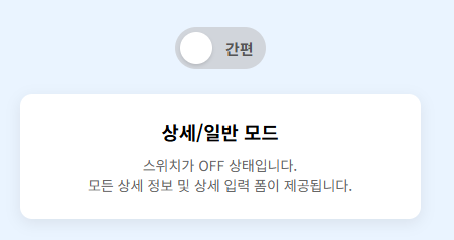
※ 해당 내용은 Google Gemini 에서 작성되었습니다.
'WEB > JavaScript' 카테고리의 다른 글
| 사이트 링크 이동 스크립트 (0) | 2026.08.21 |
|---|---|
| 글자 롤링 배너 (0) | 2026.03.19 |
| 전단계 결재자 포함 조직도 (0) | 2026.03.05 |
| 결재팝업 결재자 체크 선택 펼침 포함 (0) | 2026.03.05 |
| 결재선 지정 선택 팝업 (0) | 2026.03.05 |
댓글
공지사항
최근에 올라온 글
최근에 달린 댓글
- Total
- Today
- Yesterday
링크
TAG
- 위로곡 #위로노래
- 좋은책
- Figma #Figma단축키
- 정보처리기사 #정보처리기사요약 #정보처리기사요점정리
- thymeleaf
- 국악힙합 #힙합 #ai생성노래 #ai생성음악 #ai노래 #ai음악
- echart
- ajax
- 피그마플러그인 #Iconify #contnetReel #stark #Figma #Figma플러그인
- SQL명령어 #SQL
- 트롯 #신나는트롯 #ai생성음악 #ai노래 #인생노래 #ai음악
- 애끼는잼프 #따뜻해잼프 #집걱정덜고꿈은더크게 #청년주거지원 #청년복지 #2027예산안 #청년임대주택 #청년월세지원 #전세보증료지원 #혼인출산양육지원 #청년문화예술패스 #청년정책 #정책송 #신나는록 #응원송 #AI음악 #AI노래 #실버라인 #silverlineAiMusic
- KTX #SRT #KTXSRT통합 #코레일플러스 #고속철도 #기차표예매 #요금인하 #좌석확대 #정책송 #정책노래 #놀라워잼프 #애끼는잼프 #AI음악 #AI노래 #실버라인
- 트롯 #신나는트롯 #인생노래 #ai생성음악 #ai음악
- jQuery #jQuery이미지슬라이드 #이미지슬라이드
- #AI와함께 #AI와협업 #AI에세이
- 시크하게 #오나의비타민 #나답게그래나답게 #음원출시 #silverlineAiMusic #silverlineAiMusic음원 #silverlineAiMusic음원출시
- typographyGuideline
- 위로곡 #위로노래 #발라드 #발라드노래 #ai생성음악 #ai음악 #ai노래 #ai발라드 #아이에게 #사춘기방황 #방황하는아이에게
- 트롯 #애절한트롯 #인생노래 #ai생성음악 #ai음악
- 응원곡 #충분히잘해왔어 #충분히잘해왔어가사 #ai생성음악 #ai노래 #ai음악 #ai노래
- 피그마 #피그마단축키
- 결국나 #앨범출시 #silverlineAiMusic #AI음악 #위로의노래
- 인생머있냐가는거지 #앨범출시 #silverlineAiMusic #AI음악 #신나는노래 #인생2막
- 국악힙합 #힙합 #ai생성노래 #ai생성음악 #ai노래 #ai음악 #silverlineAiMusic
- #1인AI음악제작팀 #나는AI와음악을만들기로했다 #silverlineAiMusic
- AI #AI시대 #AI음악 #AI노래 #AI활용 #AI음악만들기
- 인생은매운맛 #신나는트롯 #댄스트롯 #트롯 #트로트 #남자보컬 #인생노래 #오히려좋아 #화끈한인생 #AI생성음악 #AI노래 #ai음악 #silverlineAiMusic
- 트롯 #트로트 #신나는트롯 #인생노래 #ai생성음악 #ai음악
- 발라드 #발라드노래 #이별노래 #ai생성음악 #ai음악 #ai노래 #ai발라드
| 일 | 월 | 화 | 수 | 목 | 금 | 토 |
|---|---|---|---|---|---|---|
| 1 | 2 | 3 | ||||
| 4 | 5 | 6 | 7 | 8 | 9 | 10 |
| 11 | 12 | 13 | 14 | 15 | 16 | 17 |
| 18 | 19 | 20 | 21 | 22 | 23 | 24 |
| 25 | 26 | 27 | 28 | 29 | 30 | 31 |
글 보관함